
Las obras de Arquímedes
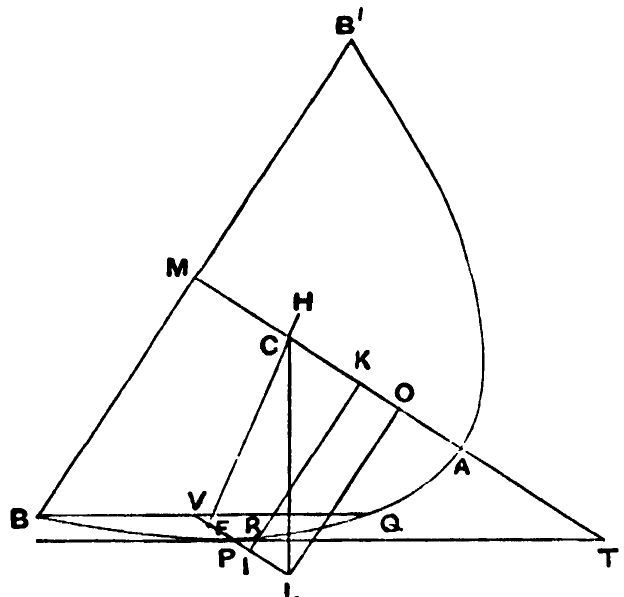
Entonces, puesto que CO = ½p, CL debe ser perpendicular a PT y, por tanto, a la superficie del fluido.
Y las fuerzas que actúan sobre la parte sumergida del paraboloide y sobre la parte situada por encima de la superficie actúan, respectivamente, hacia arriba y hacia abajo, a lo largo de rectas que pasan por F y H y son paralelas a CL.
Por tanto, el paraboloide no puede permanecer en la posición en que B apenas toca la superficie, sino que debe girar en el sentido de aumentar el ángulo PTM.
La demostración es la misma cuando el punto I no está en VP, sino en su prolongación, como en la segunda figura*.
[Con la notación de la p. 266, si la base BB′ toca la superficie del fluido en B, tenemos
y, por la propiedad de la parábola,
Por tanto
Para obtener el resultado de la proposición, debemos eliminar k entre esta ecuación y
* Es curioso que las figuras de Torelli, Nizze y Heiberg sean todas incorrectas, pues sitúan el punto que he llamado I en BQ en vez de en la prolongación de VP.
274